
Carrier Services
Screenshots



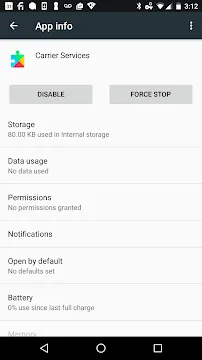
Carrier Services for Android is a critical system app from Google. It manages advanced communication features on your phone. This app works silently in the background. It helps your device connect to mobile networks properly. Many users do not know what this app does. You might see it in your app list and wonder about its purpose. This content explains everything you need to know. We will cover its functions, benefits, and management tips. You will learn why Carrier Services improves your texting and calling experience.
What Are the Main Functions of Carrier Services?
Carrier Services handles several key tasks. First, it supports RCS messaging. RCS stands for Rich Communication Services. This feature upgrades your standard SMS. You can send high-quality images and videos. You also see read receipts and typing indicators. Second, the app manages Wi-Fi calling. It ensures your calls switch smoothly between Wi-Fi and cellular networks. Third, it improves cross-carrier compatibility. This means you can chat with friends on different networks without issues.
- Supports RCS messaging features.
- Enables Wi-Fi calling and handover.
- Improves cross-carrier communication.
- Updates carrier settings automatically.
- Fixes network-related bugs quickly.
The app receives regular updates from Google. These updates add new features and security patches. Without this service, your phone may lose advanced messaging options. You might also face dropped calls or connection problems.
How to Manage and Update Carrier Services
Managing this app is simple. You can find it in your phone’s settings. Go to Apps or Application Manager. Look for Carrier Services in the list. You will see options to force stop, disable, or clear data. However, experts recommend leaving it untouched. Disabling the app can break messaging and calling features.
Check for Updates Regularly
Updates are crucial for this app. Google releases updates through the Play Store. Open the Google Play Store app. Search for Carrier Services. Tap the update button if available. Enable automatic updates for best results. This ensures you always have the latest features and security fixes. An outdated version may cause compatibility problems with your carrier.
Why Should You Keep Carrier Services Enabled?
Many users consider disabling system apps. You should not disable Carrier Services. Here is why. First, it enables RCS messaging. RCS offers a richer texting experience. You can share large files and see when messages are delivered. Second, it supports emergency services. The app helps your phone connect to emergency numbers quickly. Third, it reduces battery drain. The app optimizes how your phone talks to cell towers. Without it, your device may search for networks constantly. This action consumes more power.
- Maintains RCS messaging functionality.
- Assists with emergency call connections.
- Prevents unnecessary battery drain.
- Fixes network handover problems.
- Provides seamless carrier updates.
You also benefit from better call quality. The app manages voice over LTE (VoLTE). VoLTE gives you clearer calls and faster call setup times. Disabling the service removes these benefits.
Common Issues and Troubleshooting Tips
Sometimes Carrier Services may cause problems. You might notice battery drain or message failures. Do not worry. Most issues have simple fixes.
Clear App Cache and Data
First, try clearing the cache. Go to Settings > Apps > Carrier Services. Tap Storage & Cache. Select Clear Cache. If problems continue, select Clear Storage. This action resets the app. Your messages and contacts remain safe. The app only loses temporary settings.
Other troubleshooting steps include:
- Restart your phone.
- Check for system updates.
- Reinstall the app from Play Store.
- Contact your carrier for network issues.
- Reset network settings as a last step.
Remember to update the app first. Many bugs disappear with the latest version. If you recently switched carriers, the app may need time to adapt.
Privacy and Security Aspects of Carrier Services
Privacy is a top concern for Android users. Carrier Services handles your messages and call data. Google states that the app follows strict privacy rules. It does not store your personal messages on external servers. The app only processes data locally on your device. It manages RCS features through your carrier’s network. Your conversations remain encrypted during transmission.
- Processes data only on your device.
- Uses encryption for RCS messages.
- Does not share personal content with Google.
- Requires no special permissions beyond network access.
- Updates often include security patches.
You can review the app’s permissions. Go to Settings > Apps > Carrier Services > Permissions. You will see only network-related permissions. The app does not access your contacts or location. This limited access protects your privacy. Always download updates from the official Play Store. Avoid third-party sources to prevent malware risks.
When to Contact Your Carrier
Sometimes the app works correctly, but your carrier has issues. Contact your carrier if you face persistent problems. Ask them about RCS support and VoLTE availability. Not all carriers support every feature. The app works best on major networks. Smaller carriers may have limited functionality.
Final Thoughts
Carrier Services for Android is a vital system app. It enables modern messaging and calling features. You should keep it enabled and updated. The app works silently to improve your phone experience. It supports RCS, Wi-Fi calling, and VoLTE. Most users never interact with it directly. That is fine. The app does its job in the background. Troubleshooting is simple if issues arise. Clear the cache or reinstall the app. Do not disable it permanently. You will lose important features. Trust this app to manage your carrier connections. Your phone will perform better with it active.